Amberlo has a great timesheet and expense approval process to help you manage your employees and their work faster and easier. This feature is only valid for Premium users and can be turned on through the Account settings.
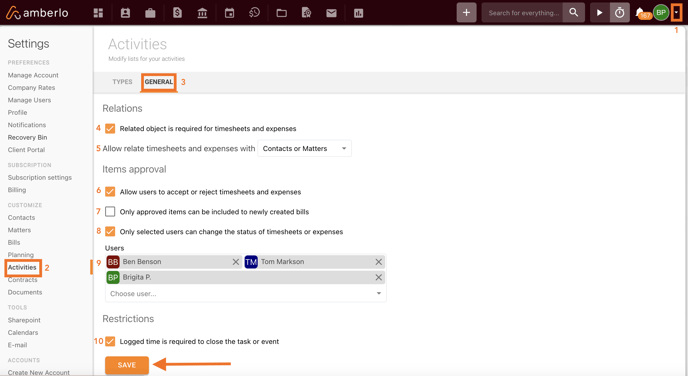
Go to Account settings (1), select Activities (2), then select General (3). This is where you can set the rules for the timesheet approval process.
4 – ensure that the timesheet or expense always has a Contact or a Matter assigned to it (recommended to turn on);
5 – select which card (contact/matter) should be assigned to timesheets or expenses. You can choose to allow only contact cards, only matter cards or both (recommended to assign matter cards);
6 – turn on or off the timesheets/expenses approval;
7 – this adds extra functionality, allowing to invoice only approved items. Without the approval, the timesheets or expenses won’t be added to the new invoices.
8 – this enables the approval process only for specific people you choose from your user list.
9 – select the specific people that will have the right to approve or reject the timesheets here.
10 – enable a mandatory time log for your employees when they work with tasks or events (recommend enabling this).
4 – ensure that the timesheet or expense always has a Contact or a Matter assigned to it (recommended to turn on);
5 – select which card (contact/matter) should be assigned to timesheets or expenses. You can choose to allow only contact cards, only matter cards or both (recommended to assign matter cards);
6 – turn on or off the timesheets/expenses approval;
7 – this adds extra functionality, allowing to invoice only approved items. Without the approval, the timesheets or expenses won’t be added to the new invoices.
8 – this enables the approval process only for specific people you choose from your user list.
9 – select the specific people that will have the right to approve or reject the timesheets here.
10 – enable a mandatory time log for your employees when they work with tasks or events (recommend enabling this).

We hope this will help you to start using it smoothly. If you have any questions or feedback, please feel free to contact us via support@amberlo.io. We are always happy to hear from you!
Related to