This is where you can manage users, titles and security roles.
Note: Only Account Administrators can access and manage User's Settings.
How to access Manage Users Settings?
1. Go to General Settings by clicking on your profile picture in the top right corner.
2. Click Manage Users in the left-hand menu:

From the Manage Users section, you can:
1. Access Users tab.
2. Access Rates Positions tab:
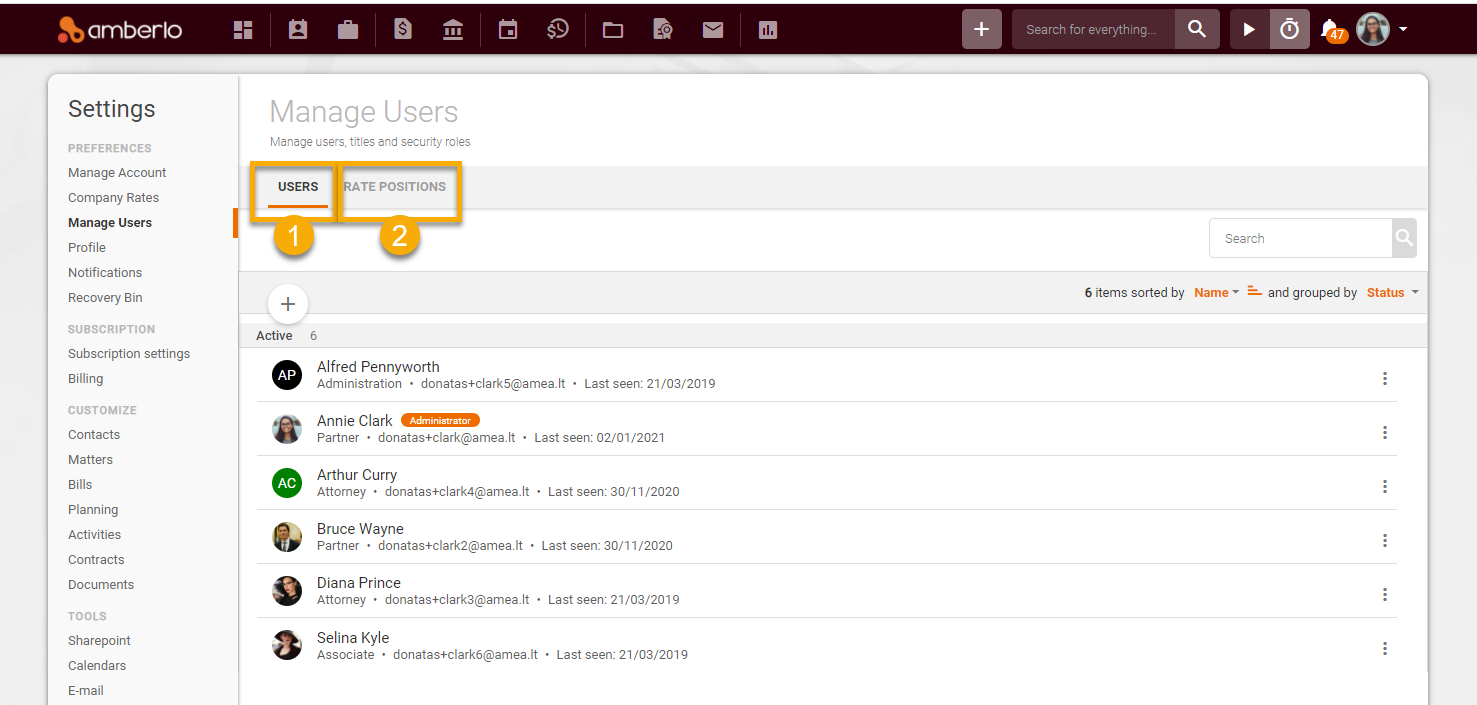
1. On the tab USERS, you can:
- Add User to Amberlo (Read more);
- Edit User data (Read more);
- Set Permissions to User (Read more);
- Deactivate or Delete User (Read more).
-
Sort and Group Users (Read more).
- Use the Search on Users list (Read more):

2. On the tab RATE POSITIONS, you can:
- Add New Rate Positions (Read more);
- Edit Rate Positions (Read more);
- Remove Rate Positions (Read more):

We hope this will help you to start using it smoothly. If you have any questions or feedback, don't hesitate to get in touch with us via support@amberlo.io. We are always happy to hear from you!
Related to